Understanding ADFS: A Practical Architectural Demonstration
Publish Date: 2026-07-11 6 min read
If you’ve ever logged into a third-party application like Salesforce, Zoom, or Microsoft 365 using your company’s standard Windows credentials, you’ve experienced the quiet magic of Single Sign-On (SSO). For organizations rooted in Microsoft environments, the engine behind that magic is often Active Directory Federation Services (ADFS).
But how does it actually work behind the scenes — and, just as importantly, how does it let an external cloud app trust your identity without ever seeing your password? Let’s break down the architecture and walk through the exact authentication flow, going beyond the jargon to see how the pieces fit together.
What is ADFS?
At its core, ADFS is a secure bridge. It lets users authenticate to external applications (or across organizational boundaries) without creating new usernames and passwords, and without the organization ever exposing its internal Active Directory (AD) database to the outside world.
Instead of sharing passwords, ADFS shares claims — secure, digitally signed tokens that essentially say: “I am the trusted identity provider, and I verify that this user is who they say they are, and here are a few facts about them.”
The Core Architecture
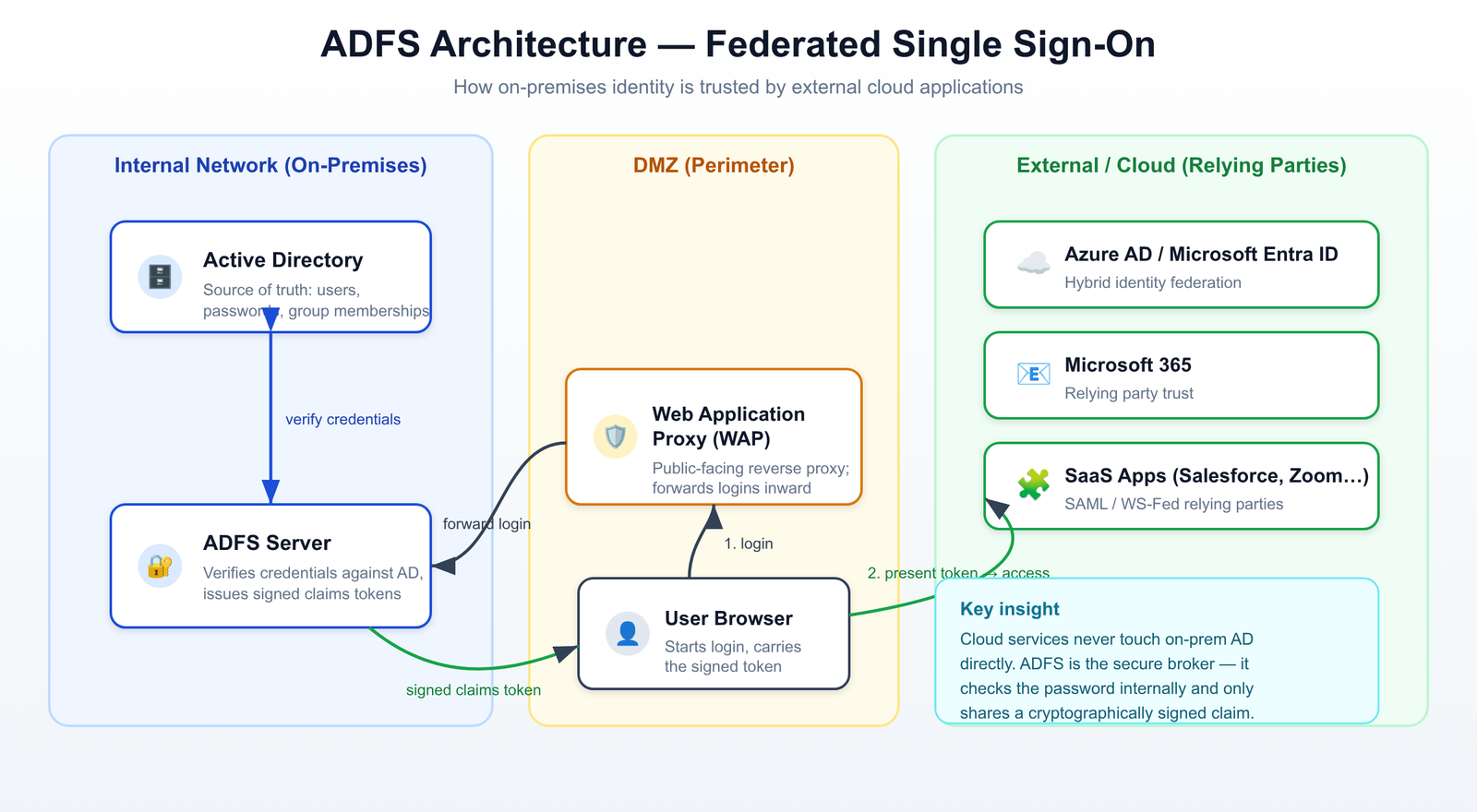
To make this work, ADFS relies on a handful of components working in concert, each living in a specific network zone:
- Active Directory (AD) (Internal Network): The source of truth. It holds all user accounts, passwords, and group memberships.
- ADFS Server (Internal Network): The token issuer. It talks to AD to verify credentials, then generates the signed claims token for the external app.
- Web Application Proxy (WAP) (DMZ — Demilitarized Zone): The bouncer. It sits facing the public internet, intercepts login requests, and forwards them safely to the internal ADFS server — so the ADFS server itself is never directly exposed.
- Relying Party Trust (External Cloud / SaaS): The application you’re trying to reach (Microsoft 365, Salesforce, and so on). It “relies” on ADFS to perform the actual authentication.
Here is how these components map out in a modern hybrid identity environment, specifically when connecting on-premises AD to cloud services like Microsoft Entra ID (formerly Azure AD):
The Authentication Flow, Step by Step
When a user accesses a federated application, the whole exchange happens in milliseconds. Here is the exact sequence of what occurs the moment you click “Login”:
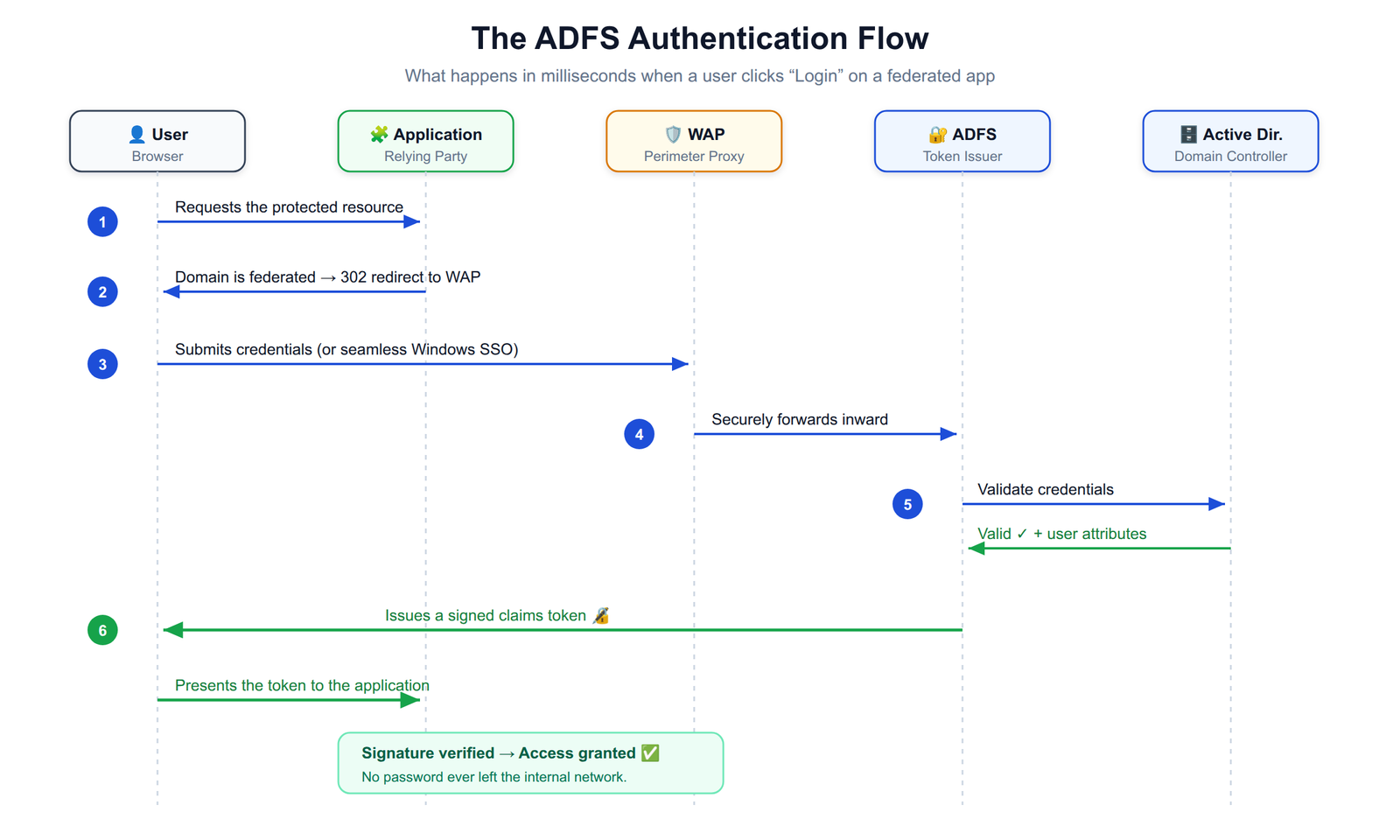
- The initial access request: The user opens a browser and navigates to the external application (the relying party).
- Redirection to ADFS: The application recognizes that the user’s email domain belongs to a federated organization. Instead of asking for a password, it redirects the browser to the organization’s public-facing Web Application Proxy (WAP).
- Credential prompt & forwarding: The WAP presents a login page (or uses seamless Windows integrated authentication). The user’s credentials are securely forwarded to the internal ADFS server.
- Verification with Active Directory: The internal ADFS server checks the provided credentials against the on-premises AD domain controller.
- Token generation: Once AD confirms the password is correct, the ADFS server builds a security token containing specific claims (email, name, group memberships…) and signs it with its private token-signing certificate.
- Redirection and access granted: The token is sent back to the browser, which forwards it to the external application. The application verifies the digital signature, trusts the claim, and logs the user in — no password ever crossed the perimeter.
Security Considerations You Can’t Skip
The elegance of ADFS is also where its risk concentrates: because it is the identity broker for potentially dozens of applications, it is a high-value target. A few things matter enormously in production:
- Token-signing certificates: The trust model rests entirely on this certificate. If it expires, every federated login breaks at once; if it leaks, an attacker can forge tokens. Monitor its rollover carefully.
- Multi-factor authentication (MFA): ADFS can enforce MFA at the point of token issuance, so a stolen password alone isn’t enough to obtain a token.
- Extranet lockout & the WAP: Because the WAP is internet-facing, protect it against password-spray attacks with extranet smart lockout, and never expose the ADFS server directly.
- Claims hygiene: Only release the claims an application genuinely needs. Over-sharing attributes is a needless data-exposure risk.
ADFS vs. Cloud Identity (Entra ID)
With the shift toward cloud-native identity providers like Microsoft Entra ID or Okta, you might wonder why anyone still runs on-premises ADFS. In practice, most new deployments do lean cloud-first — but ADFS remains relevant when:
- Legacy on-premises applications require complex, custom claims rules that cloud providers can’t easily replicate.
- Strict compliance dictates that password hashes may never be synced to the cloud — ADFS keeps authentication fully on-premises.
- An organization needs granular, on-prem control over the authentication experience and policies.
For everyone else, Microsoft’s own guidance increasingly points toward moving federation into Entra ID and retiring ADFS where possible — fewer servers, fewer certificates, less to break.
Conclusion
ADFS is, at heart, a beautifully simple idea wrapped in enterprise plumbing: prove who you are once, internally, and carry a signed, tamper-evident claim to everything else. Understanding the three trust zones and the six-step flow above is enough to reason about most real-world SSO issues — from certificate expiries to redirect loops.
If you’re weighing whether to keep, harden, or retire an ADFS footprint, start by mapping your relying parties and your compliance constraints against that flow. The architecture will tell you where it still earns its keep.
Found this useful? I write about identity, OpenShift, and data engineering — feel free to get in touch or explore more articles on the site.
0 Comments
No comments yet. Be the first to share your thoughts!